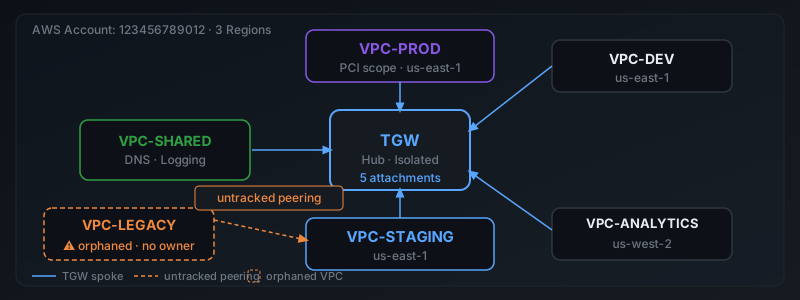
When your AWS environment is small — one or two VPCs, one account, one region — the console is enough. You can see everything by clicking around. But somewhere around five to seven VPCs, clicking around stops working. The console shows you individual VPCs. It does not show you the map.
This post covers five approaches to AWS VPC visualization: what each one actually shows, where it breaks down, and when to use it.
Why VPC Visualization Matters
The network topology determines what can talk to what. It determines whether your production environment is actually isolated from staging, whether S3 traffic is taking a free VPC endpoint or an expensive NAT path, and whether there are VPC peerings from two years ago that nobody remembers but are still live.
None of that is visible in the standard AWS console. The VPC list shows you VPCs. The TGW console shows you TGW attachments. The peering console shows you peerings. There is no view that puts them together into a network map.
Option 1: VPC Resource Map (AWS Console)
VPC Resource Map
Built-in · FreeAvailable in the VPC console under the Resource Map tab for each individual VPC. Shows subnets, route tables, internet gateways, NAT gateways, and VPC endpoints within that VPC.
- Subnet → route table associations
- IGW and NAT Gateway placement
- VPC endpoints
- Within-VPC routing structure
- Transit Gateway connections
- VPC peerings
- Cross-account topology
- Multi-VPC map
When to use it: Auditing the internal structure of a single VPC — confirming which subnets are public vs private, verifying gateway placement. Not useful for understanding how multiple VPCs connect.
Option 2: AWS Network Manager
AWS Network Manager
Built-in · FreeNetwork Manager provides a topology view of your Transit Gateway network. Register your TGW and it pulls in all attached VPCs, VPN connections, and Direct Connect connections and renders them as a diagram.
- TGW-attached VPCs
- VPN and Direct Connect connections
- Cross-account via AWS Organizations
- Route Analyzer for TGW paths
- VPC peering connections
- VPCs not attached to TGW
- Environment labels (prod/staging/dev)
- Cost or risk annotations
When to use it: Getting a high-level view of your TGW-connected network. The Route Analyzer is useful for tracing a specific path. The gap is VPC peerings — they are invisible here, and they are the source of most isolation problems.
Option 3: VPC Reachability Analyzer
VPC Reachability Analyzer
Built-in · $0.10 per analysisPoint-to-point path analysis. You specify a source and destination resource and it tells you whether a network path exists and what hops it takes. Does not produce a diagram — produces a path trace.
- Whether two resources can reach each other
- Every hop in the path
- Which security group or route table is blocking
- Full topology diagram
- Cross-account paths (limited)
- All paths simultaneously
When to use it: Answering a specific question — "can this EC2 instance in subnet A reach this RDS in subnet B?" Not useful for getting a picture of the overall network. Costs $0.10 per analysis, which adds up if you're running audits at scale.
Option 4: AWS CLI + Custom Scripting
AWS CLI
FreeUsing the AWS CLI you can pull all the raw data needed to build a topology map. The pieces:
# List all VPCs in an account
aws ec2 describe-vpcs --query 'Vpcs[*].[VpcId,CidrBlock,Tags]'

# List all peering connections
aws ec2 describe-vpc-peering-connections

# List TGW attachments
aws ec2 describe-transit-gateway-attachments

# List route tables
aws ec2 describe-route-tables
The data is all there. The challenge is joining it. Peerings reference VPC IDs and account IDs, TGW attachments reference VPC IDs and TGW IDs, and route tables reference both. Across multiple accounts, you need to assume a cross-account IAM role in each one and repeat. A usable cross-account topology script is several hundred lines.
When to use it: One-time audit, or as the data source for a custom visualization. Tools like Graphviz, D3.js, or draw.io can render the CLI output into a diagram. This approach requires engineering time to build and maintain.
Option 5: Dedicated Network Visibility Tool
Netway
Read-only IAM · No agentsNetway pulls topology data from all your AWS accounts using read-only IAM roles, joins VPCs, peerings, TGW attachments, route tables, and gateways into a single map, and flags isolation gaps and cost issues automatically.
- Full multi-account topology
- VPC peerings + TGW in same view
- Orphaned VPCs
- Isolation gaps and CIDR conflicts
- Cost issues (NAT routing patterns)
- CloudFormation deploy (5 min)
- Read-only IAM role per account
Which Approach Is Right for You?
If you have one account and fewer than five VPCs, the VPC console Resource Map and Network Manager together give you enough. If you have multiple accounts, VPC peerings across environment boundaries, or need to track topology changes over time, you need either a custom CLI script or a dedicated tool — the built-in options won't give you a complete picture.
The specific gap that catches most teams is VPC peerings. They are the most common source of unintended connectivity between environments, they are invisible in Network Manager, and they don't appear in TGW route table audits. Whatever visualization approach you use, make sure it includes peerings.
Getting Started with Netway
Register at basavytix.com/netway
Deploy the read-only CloudFormation stack in each account (5 minutes per account)
Run a scan — your full VPC topology map is generated automatically
Review isolation gaps, peering risks, and cost findings on the dashboard
Related Articles
→ AWS VPC Topology: How to Map Your Network Before It Maps You → Why Your TGW Route Tables Aren't Enough → 4 Hidden AWS Network Security RisksFrequently Asked Questions
How do I visualize my AWS VPC network?
AWS offers several built-in options: Network Manager for basic topology diagrams, VPC Reachability Analyzer for path-level analysis, and Resource Map in the VPC console for subnet-level views. For cross-account topology and full peering/TGW maps, you need a dedicated tool or custom CLI scripting.
Does AWS have a VPC topology diagram tool?
Yes — AWS Network Manager provides a topology diagram for Transit Gateway-connected networks. The VPC console also has a Resource Map tab showing subnets, route tables, and gateways within a single VPC. Neither shows cross-account connections or peerings to accounts outside your organization.
How do I map VPC peering connections across accounts?
Use aws ec2 describe-vpc-peering-connections in each account. Each result includes the accepter and requester VPC IDs and account numbers. To get a full cross-account map you need to run this in every account and join the results — or use a tool that does this automatically with cross-account IAM roles.
Can I get a diagram of all my VPCs and how they connect?
Not natively in the AWS console. AWS Network Manager covers TGW-connected VPCs in a single organization. For a complete diagram including peerings, cross-account connections, orphaned VPCs, and environment classification, you need to either script it with the AWS CLI or use a dedicated network visibility tool.